
FEATURES | MARKETING PLATFORM
Dental Scheduling Software
RevenueWell's Online Scheduling saves your team time and gives patients the convenience they expect - while still letting you decide which appointments are automatically scheduled and written back to your PMS and which ones need approval. Flexible for you. Convenient for patients. Always your call.

Your Practice, Your Rules: Customize How Patients Book
Online Scheduling on Your Terms
61% of patients say online appointment scheduling is extremely or very important when choosing a new provider, service, or location for care.
Give patients the freedom to book online without losing control of your schedule. With RevenueWell's Online Scheduling, you set the rules by building your schedule your way.
Integrations
Deep Integrations Into Your Existing Practice Management System




You're in the Driver's Seat with Online Scheduling
Your Calendar, Your Way

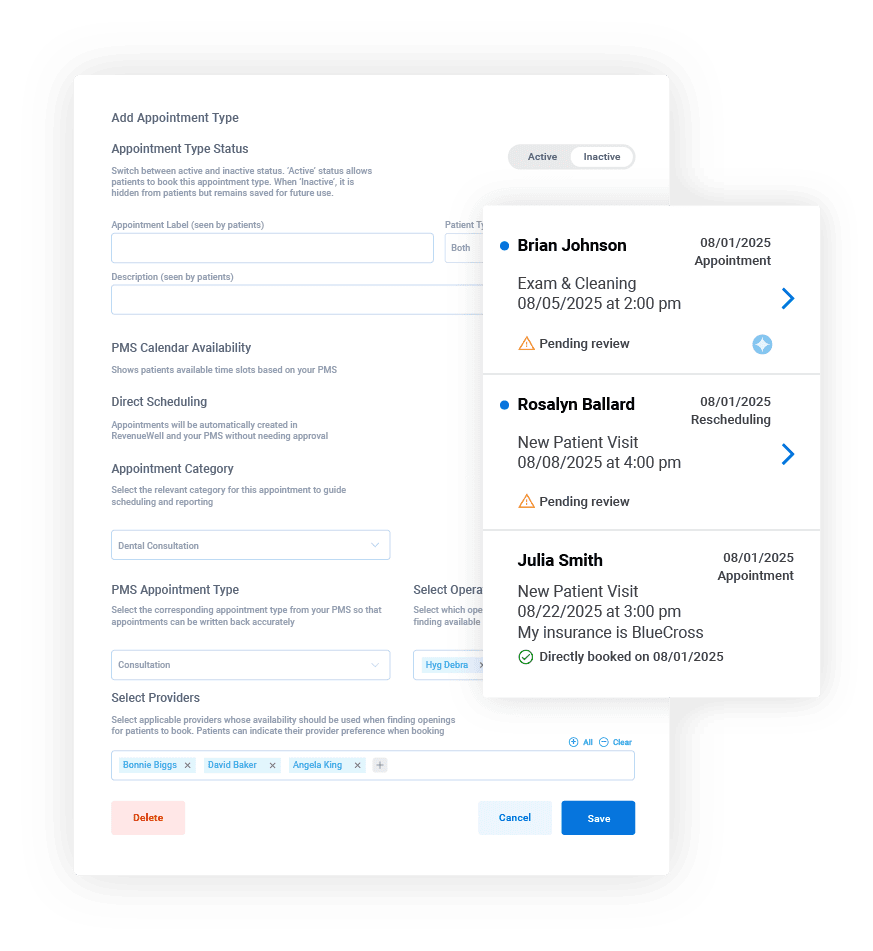
Automate the Routine
Stretched thin reviewing routine appointments? With Direct Scheduling, choose which appointment types need your approval and which ones you're comfortable automatically sending to your schedule and PMS, no approval needed. Stay in control, while cutting down your repetitive tasks.
The Appointments You Want, Info You Need
Customize your appointment requests forms so patients only book appointments based on what you want them to see. Control exactly when and what patients book, all while collecting essential details to deliver better care from the first visit.


Real-Time Booking, Zero Confusion
Patients can view your real-time availability and book appointments online. You decide which appointment types are confirmed automatically and which require your review first. The result? A faster, clearer scheduling experience - with less back-and-forth.
AI Keeps You Fully Booked
RevenueWell's AI Virtual Assistant helps patients book online anytime, so your schedule fills even when you're off the clock. You can configure it to run specific appointment types by you first or automatically send them to your schedule and PMS without approval.
*AI Virtual Assistant is an add-on to the Marketing Platform.

Frequently Asked Questions
Yes, online scheduling, including direct scheduling, is included with your RevenueWell software subscription. It’s not an add-on. Our AI Receptionist – Integrated option, which also integrates with our online scheduling tool is available at an additional cost. This is if you want to take the automation even further and would like the ongoing support for after-hours, weekends, and holidays.
Our online scheduling tool integrates with the following PMSs: Eaglesoft, OpenDental, Dentrix, Dentrix Ascend, and more. The integration depth does vary by the PMS version. We recommend talking with our team to get more specifics about your PMS version.
Turning on the PMS sync lets appointments created in RevenueWell, including approved patient requests sync back to your PMS automatically. Integration depth varies by the PMS version, so be sure to ask our team if you’re interested in learning more.
Yes, you maintain control of appointment bookings. By default, your available booking hours match your practice hours, but you can set separate hours just for online scheduling and block off specific days and/or times whenever you need to. You can also control the appointment types that patients can book, how far in advance they can book, how much minimum notice is required, and how frequently appointment times start.
Yes. When Insurance Fields are enabled, patients can enter their insurance details on both the appointment request form. If you have our Insurance Verification tool, it will automatically run a verification when the insurance is captured on the form.
Direct scheduling allows eligible appointments to be written directly to your Schedule in RevenueWell and your PMS calendar without staff review. The AI Receptionist can offer and book appointment types for patients through web chat and inbound phone calls during days and nights. It’s 24/7 ongoing coverage. Both require PMS Calendar availability to be turned on for the appointment type. Direct scheduling is not an add-on, so you get instant access to it. Direct scheduling is also an optional feature. If you prefer to review every appointment, you can do that. Our AI Receptionist is available as an add-on to online scheduling.
Yes. You can set the duration, restrict it to new and/or returning patients, which operatories you want to use, and preferred provider for each appointment type.
That depends on how you've configured Scheduling. With PMS-based scheduling off, patients submit their preferred days and time ranges, and your team manually adds approved appointments to your PMS. With PMS-based scheduling on, patients pick an exact available time pulled straight from your PMS, and accepted appointments sync back automatically. With Direct Scheduling, eligible appointments are booked straight onto your calendar without staff approval, and appear in Scheduling Alerts with full details.
Control Where It Matters, Automation Where It Helps
Whether you want full control or less routine work on your plate, RevenueWell gives you the power to choose the path that fits your practice.
